
This post contains affiliate links. If you purchase through our links, we may earn a small commission at no extra cost to you.
Best Coding Toys for Kids Under 5 (2026)
When I tell people my four-year-old is learning to code, I usually get one of two reactions: a knowing nod from fellow nerd parents, or a look of mild horror from people who picture a preschooler hunched over a laptop writing Python. Let me be clear: nobody in my house under the age of thirty is writing Python. When we talk about coding for young kids, we’re really talking about computational thinking — sequencing, pattern recognition, cause and effect, logical reasoning, and breaking problems into smaller steps.
These are skills that show up everywhere, not just in computer science. When your three-year-old figures out that the robot needs to turn left before going forward to reach the treat, they’re debugging. When they rearrange the sequence because the first attempt didn’t work, they’re iterating. These are the foundations of how programmers think, delivered through play instead of screens.
I’ve tested a lot of coding toys with my three kids over the past few years. Some were brilliant. Some were overcomplicated nightmares that ended in tears (mine, not the kids’). Here are the ones that actually work, organized by type so you can find the right fit for your child.
Our Top 3 Overall Picks
| Toy | Type | Ages | Price |
|---|---|---|---|
| Cubetto by Primo Toys | Screen-free, tactile coding | 3-5 | $225 |
| Learning Resources Botley 2.0 | Screen-free, remote-programmed robot | 2.5-5 | $45-55 |
| ScratchJr App (free) | Tablet app, visual block coding | 4-5 | Free |
Screen-Free Coding Toys
If you’re like our family and want to keep screens to a minimum for young kids, these are your best bets. Every one of these toys teaches real coding concepts — sequences, loops, conditionals — without a single pixel involved.
Cubetto by Primo Toys
Best for: Ages 3-5, Montessori-style tactile coding | Price: $225
Cubetto is the gold standard of screen-free coding toys, and yes, it’s pricey. But here’s why it earns its spot at the top: it’s a beautifully designed wooden robot that kids program by placing colored blocks into a physical control board. Each block represents a direction (forward, left, right) and the “function” line lets kids create reusable subroutines — which is an actual programming concept. My daughter picked it up intuitively at three. The Montessori-inspired design means it feels like a natural part of play rather than an “educational” chore. The adventure maps and story packs give it context and replayability. If budget allows, this is the one to get. If it doesn’t, keep reading — there are great alternatives below.
Fisher-Price Code-a-Pillar Twist
Best for: Ages 2-4, very first coding experience | Price: $25-30
The Code-a-Pillar was our first coding toy and it’s a fantastic entry point for younger kids. It’s a caterpillar made of connected segments — each segment has a dial that you twist to choose a direction (straight, left, right) or an action (dance, sound). Connect the segments in order, press go, and the caterpillar follows the sequence. My two-year-old didn’t fully grasp the directional logic at first, but he loved connecting segments and watching the caterpillar move. By two and a half, he was deliberately programming paths. That progression from “I pushed a button and something happened” to “I planned a route and it worked” is exactly what you want to see.
Learning Resources Botley 2.0 the Coding Robot
Best for: Ages 2.5-5, programmable robot with growing complexity | Price: $45-55
Botley is a phenomenal middle-ground toy. You program him with a handheld remote by pressing directional arrows, then hit go and he executes the sequence. What makes Botley 2.0 special is the skill ceiling: beginners can do simple three-step programs, but advanced users can chain up to 150 steps, use loops, and program if/then logic using the included obstacle detection feature. My four-year-old builds elaborate obstacle courses out of blocks and then programs Botley to navigate them. When Botley crashes into a wall, she doesn’t get frustrated — she says “I need to debug it” and tries again. That sentence alone was worth the fifty dollars.
ThinkFun Robot Turtles Board Game
Best for: Ages 3-5, family game night coding introduction | Price: $20-25
This is a board game, not a tech toy, and that’s exactly why it belongs on this list. Kids play cards (forward, turn left, turn right) to navigate their turtle through a maze to reach a jewel. A parent acts as the “computer” and moves the turtle exactly as programmed — even if the instructions send the turtle straight into a wall. This teaches kids that computers do exactly what you tell them, nothing more and nothing less. It’s hilarious when their turtle walks into an ice wall because they forgot to program a turn. It’s also a great family game that even my seven-year-old still enjoys. The “laser” card that melts ice walls introduces function calls. Sneaky and brilliant game design.
Educational Insights Coding Critters
Best for: Ages 3-5, storytelling meets coding | Price: $35-40
Coding Critters wrap coding concepts inside a pet-care narrative, which was the hook for my animal-obsessed middle child. You program your critter (a puppy, bunny, or dinosaur) using a coding wand, guiding them through a storybook adventure. The critter responds to commands, plays, and even has a “pet mode” where it reacts to being held and cuddled. The coding itself is solid — sequential programming with branching paths in the storybook. But the real genius is that kids who aren’t naturally drawn to robots and mazes might be drawn to a cute animal friend. This was the toy that got my most tech-resistant kid interested in programming concepts.
App-Connected Coding Toys
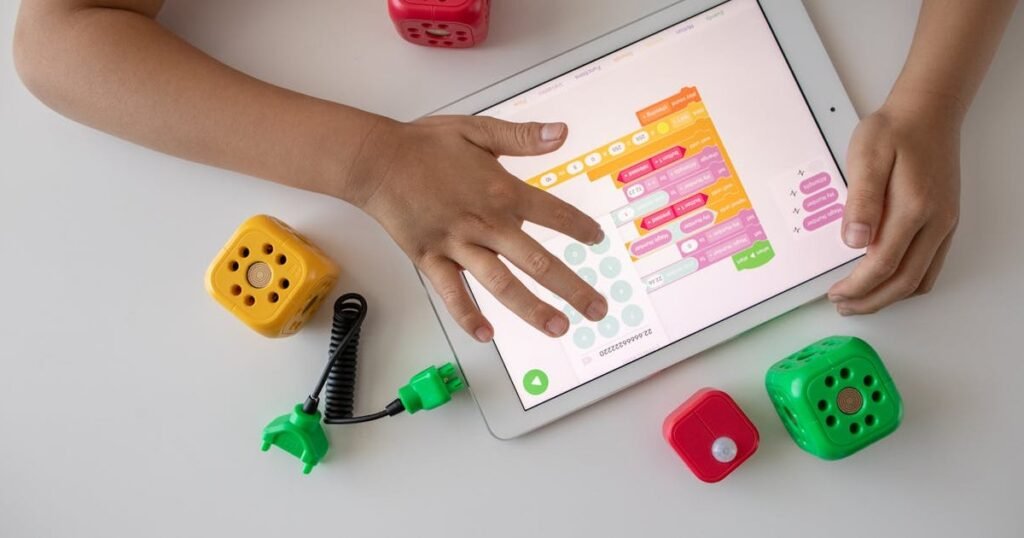
These toys combine physical play with a tablet or smartphone app. I generally recommend them for ages four and up, and always with a parent participating — not because the apps are inappropriate, but because the learning deepens dramatically when an adult can ask questions like “what do you think will happen if we change that block?”
Osmo Coding Starter Kit
Best for: Ages 4-5, physical-digital hybrid coding | Price: $80-100
Osmo is the bridge between physical manipulation and on-screen results. Kids snap together physical coding blocks on the table — walk, jump, repeat, numbers — and the iPad camera reads the sequence and moves a character on screen accordingly. The game “Coding Awbie” starts simple (move the character to the strawberry) and builds to surprisingly complex programs with loops and subroutines. What I love is that the actual coding is physical — kids are picking up and rearranging real blocks, not dragging icons on a screen. My daughter grasped loops through Osmo faster than with any other toy: “Oh, I just put the number 3 next to the jump block and he jumps three times!” You need an iPad or Fire tablet and the Osmo base, so factor that into the cost.
Matatalab Coding Set
Best for: Ages 3-5, tangible coding with artistic expression | Price: $140-160
Matatalab is similar in concept to Cubetto but adds some unique twists. Kids place coding blocks on a control board, press go, and a small robot executes the program. What sets it apart is the creative expansion — with add-on packs, the robot can draw (attach a marker), play music (coding notes and rhythms), and navigate sensor-based challenges. The music coding pack was a hit in our house: my kids composed simple melodies by arranging note blocks in sequence, which is really just coding with a musical output. The drawing attachment is also brilliant — kids write programs and then see the geometric patterns their code creates. It’s more expensive than Botley but offers more creative range.
KIBO Robot Kit (by KinderLab Robotics)
Best for: Ages 4-5, arts-integrated robotics | Price: $200-230
KIBO was developed at Tufts University’s DevTech Research Group, and it shows — the pedagogy behind this toy is rock solid. Kids build the robot from modular components (wheels, sensors, light modules), then program it by scanning physical wooden blocks with a built-in scanner. What makes KIBO unique is the decoration platform on top: kids can draw on it, tape things to it, build structures on it, turning their robot into a character, an animal, or a vehicle. This blend of engineering, coding, and art is genuinely unique. KIBO is used in many preschool classrooms, so your child might already be familiar with it. It’s an investment, but the research-backed design and build quality justify the price.
Best Coding Apps for Pre-Readers
Sometimes a well-designed app is the right tool, especially for rainy days or travel. These are our family’s favorites — all usable by pre-readers thanks to visual and audio cues instead of text.
ScratchJr (Free — iPad, Android, Chromebook)
Best for: Ages 4-5, first visual programming language | Price: Free
ScratchJr is the preschool version of Scratch, the visual programming language developed at MIT. Kids snap together colorful blocks to make characters move, dance, sing, and interact. The interface is icon-based, so pre-readers can use it independently once shown the basics. My five-year-old made a “movie” where a cat walks across the screen, meets a dog, and they dance together. She was beaming. That “movie” was a multi-object program with sequential events and parallel execution, but she just thought she was telling a story. ScratchJr is free, genuinely well-designed, and has an active community sharing projects. It’s the first app I recommend to every parent.
Lightbot Jr (iOS, Android — $3)
Best for: Ages 4-5, puzzle-based coding logic | Price: $3
Lightbot Jr is a puzzle game where kids program a robot to light up tiles on a grid. Instructions are visual (arrow icons for direction, a lightbulb icon to light a tile), and the puzzles gradually introduce procedures (reusable instruction sets) and loops. It’s simple, elegant, and progressively challenging. My kids treated it like a puzzle book — they’d work through a few levels, get stuck on one, think about it, and come back later with a solution. There are no in-app purchases, no ads, and no social features. Just clean puzzle design. At three dollars, it’s the best value on this list.
Code Karts (iOS, Android — Free with in-app purchases)
Best for: Ages 3-5, pre-coding logic through racing | Price: Free (first 10 levels), $3 for full version
Code Karts disguises coding as a racing game. Kids arrange directional tiles to guide a car through a track to the finish line. Early levels are simple left-right-straight sequences. Later levels add conditional tiles (if wall, turn) and optimization challenges (reach the finish in the fewest moves). The racing theme appealed to my son who wasn’t initially interested in the “cute animal” coding toys. The free version has enough content to determine if your child likes it before committing to the full purchase. Sound design is great too — the satisfying “vroom” when the car follows instructions correctly is instant positive reinforcement.
Age-by-Age Coding Progression
Not sure where to start? Here’s what to expect at each age based on my experience with three kids and way too many coding toys:
Ages 2-3: The Basics
- What they can do: Simple two-to-three-step sequences (forward, forward, turn). Basic cause and effect (I press this, the robot does that).
- What to expect: Lots of trial and error. They’ll press buttons randomly at first, and that’s fine — they’re learning that their input creates output.
- Best toys: Code-a-Pillar, Botley (in basic mode), Coding Critters
- Parent role: Heavy involvement. You’re narrating the cause-and-effect: “You pressed forward twice, so Botley went forward two spaces! What if we add a turn?”
Ages 3-4: Building Sequences
- What they can do: Four-to-six-step sequences. They start to predict what their program will do before pressing go. They can identify simple bugs (“Oh, I needed a left turn, not a right turn”).
- What to expect: This is when the “aha” moments start. Your child will begin programming intentionally rather than randomly.
- Best toys: Cubetto, Botley (intermediate mode), Robot Turtles board game, Matatalab
- Parent role: Moderate involvement. Ask guiding questions instead of giving answers. “Hmm, the robot went past the target. What could we change?”
Ages 4-5: Real Complexity
- What they can do: Longer sequences (8+ steps). Understand loops (“do this three times”). Beginning to grasp conditionals (“if the robot sees a wall, turn”). Can use visual programming apps independently.
- What to expect: Kids at this age start creating their own challenges and goals, not just following prescribed ones. This self-directed exploration is where the deepest learning happens.
- Best toys: ScratchJr, Osmo Coding, KIBO, Botley (advanced mode), Lightbot Jr
- Parent role: Light involvement. Let them struggle productively. Celebrate the debugging process, not just the solution.
Frequently Asked Questions
Is my child too young for coding toys?
If your child is under two, they’re probably too young for toys specifically labeled as “coding” toys. But they’re not too young for the underlying skills. Stacking blocks in order (sequencing), nesting cups by size (sorting), pressing a button to make music play (cause and effect) — these are all pre-coding skills. Start with general STEM toys and introduce dedicated coding toys around age two to two and a half, when they can follow simple two-step sequences.
Do coding toys actually teach coding, or is that just marketing?
The good ones teach genuine computational thinking skills that directly transfer to real programming later. Sequencing, loops, debugging, conditional logic, functions — these concepts are present in real programming languages. A kid who has spent years thinking this way through play has a significant head start when they encounter actual code. That said, some toys do slap “STEM” or “coding” on the box as a marketing play without much substance. The toys on this list all teach real concepts.
Screen-free or app-connected: which is better?
For kids under four, I prefer screen-free toys. Physical manipulation is how young children learn best — they need to touch, hold, and move things. After four, well-designed app-connected toys like Osmo and ScratchJr add valuable capabilities (visual feedback, creative expression, more complex logic) that pure physical toys can’t match. The ideal progression is screen-free first, then add app-connected toys as a supplement. We still use both in our house — my five-year-old plays with Cubetto and ScratchJr in the same week.
How much should I spend on coding toys?
You can start for free with ScratchJr (if you already have a tablet) or under $30 with the Code-a-Pillar or Robot Turtles. The mid-range sweet spot is $35-55, where Botley and Coding Critters live — these offer excellent value with room to grow. Premium options like Cubetto ($225) and KIBO ($200+) are genuinely wonderful but not necessary. My honest recommendation: start with Botley or Coding Critters, see if your kid takes to it, and invest more if they’re engaged. You can always expand later.
My child gets frustrated when their program doesn’t work. How do I handle that?
This is actually the most valuable part of the learning process — it’s debugging, and it’s what real programmers spend most of their time doing. Normalize it: “The program didn’t work the way we expected. That happens to all programmers! Let’s figure out where it went wrong.” Walk through the sequence step by step together. Celebrate finding the bug as much as you celebrate fixing it. If frustration escalates, take a break and come back later. Over time, kids build resilience and learn that making mistakes is how you get better. My daughter now says “I need to debug this” when something goes wrong, and I consider that one of my greatest parenting achievements.